

Catch up with a chat summary
Summarise today, the last 7 days, everything since your last reply or dates you pick, and see what the customer wants, what was promised and the next step.
When a chat is long, or a colleague hands one over, Tic Buddy tells you where it stands in a few lines. An owner or admin has to turn it on first.
Make a summary
- Open the chat and the customer panel beside it.
- Under AI, find Chat summary.
- Choose the span: Today, Since my last reply, Last 7 days, or Dates… to pick a start and end day.
- Click Summarise.
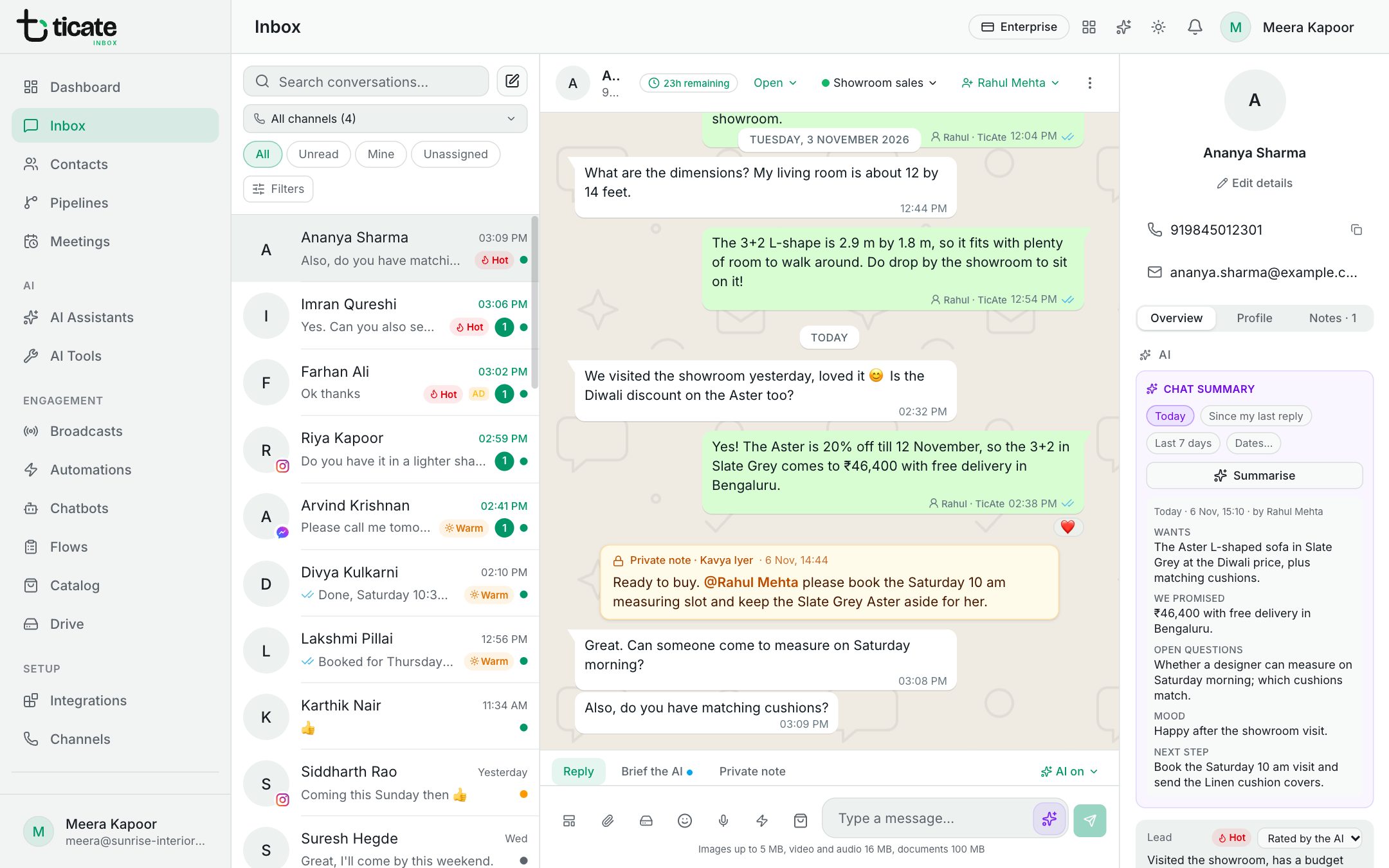
The summary is written in the language you read in, and has five parts:
- Wants: what the customer is asking for.
- We promised: what your team or the AI assistant promised them.
- Open questions: details still missing or questions not answered.
- Mood: how the customer seems to feel.
- Next step: the best thing for your team to do next.
Shared with the team
Each summary is saved on the chat. Anyone who opens the chat sees the newest one, with the span it covers, when it was made and by whom. Make a new one whenever the chat has moved on.