

When a person steps in
Which setting decides what the assistant does when your team replies, when a chat is assigned, and when the assistant hands over, and the settings most businesses should use.
Your team and the assistant should never talk over each other. Three different moments make the assistant step back, each with its own setting on the Behaviour tab.
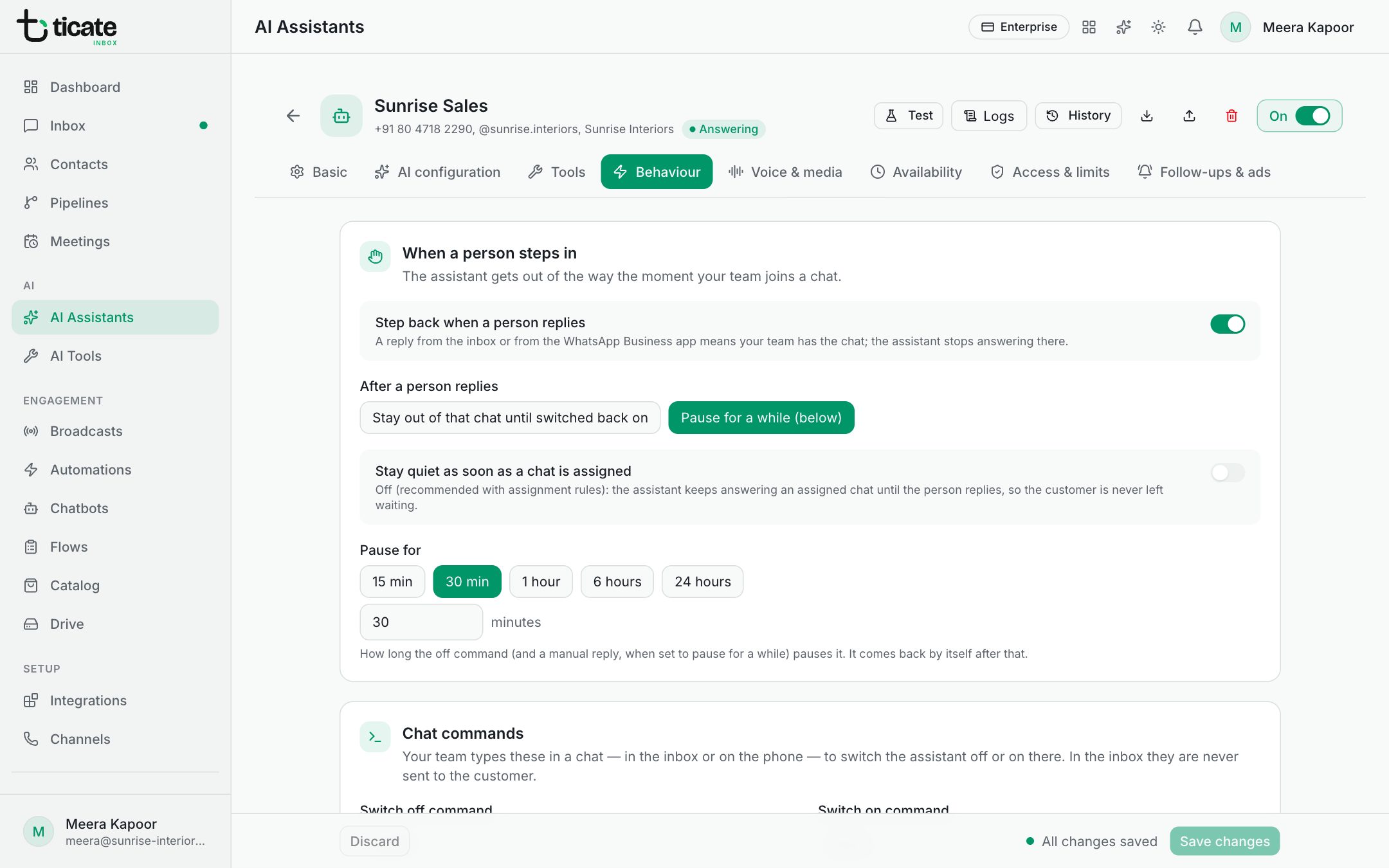
1. Someone on your team replies in the chat
A reply from the inbox, from the WhatsApp Business app on the phone, or from a connected app such as TicAte CRM counts. Automations and chatbots don't.
Step back when a person replies (on at first) decides whether the assistant stops then. Off: it keeps answering even after your team has written.
After a person replies decides for how long:
- Stay out of that chat until switched back on: it stays quiet in that chat until someone switches it back on, from the inbox or with the switch on command. New assistants start with this.
- Pause for a while (below): it stays quiet for the Pause for time after your team's latest reply. Each new reply from your team starts the wait again. Once your team has been silent that long, the assistant answers the customer's next message by itself.
2. The chat is assigned to someone
Stay quiet as soon as a chat is assigned decides this.
- Off (the usual choice): it keeps answering an assigned chat until the person actually replies; then moment 1 applies. The customer is never left waiting.
- On: the assistant goes quiet the moment the chat is assigned, even before anybody has written, and its nudges to quiet customers are cancelled. It answers again if the chat is unassigned.
3. The assistant hands the chat over
When the assistant can't help, or the customer asks for a person, it hands the chat over. Stop the assistant in that chat, under Handing over to a person, decides what happens next. On: it stays quiet there until someone switches it back on from the inbox. Off: it carries on answering after the hand-over.
Only this assistant steps back
All three hold back only the assistant whose settings they are. Another assistant can still work in the same chat, such as a follow-up assistant or the one for the customer's next CRM stage.
To stop every assistant in one chat, pause it from the chat in the inbox or type the switch off command. See Pause or switch the assistant back on in one chat.
What we recommend
For most businesses:
- Step back when a person replies: on.
- After a person replies: Pause for a while (below).
- Pause for: 24 hours.
- Stay quiet as soon as a chat is assigned: off.
- Stop the assistant in that chat: off. After a hand-over, your colleague's reply starts the 24-hour pause anyway; with this on, the assistant would stay out of that chat for good.
Your team has the chat to themselves while they are in it. If the customer writes again after a day of silence from your team, the assistant answers instead of leaving them waiting. Click Save changes.