

Sell from a module - products, estimates and invoices
Give a module's records product rows, and make estimates and invoices from them, the way a deal does.
Some modules sell things of their own: a service job with the parts it used, a property with its fees, an event with its tickets. Switch on products for such a module, and each record gets product rows, estimates and invoices, as a deal has.
Switch it on
- Open Settings → Modules and click the module. Only owners and admins can do this.
- Tick Products, estimates and invoices.
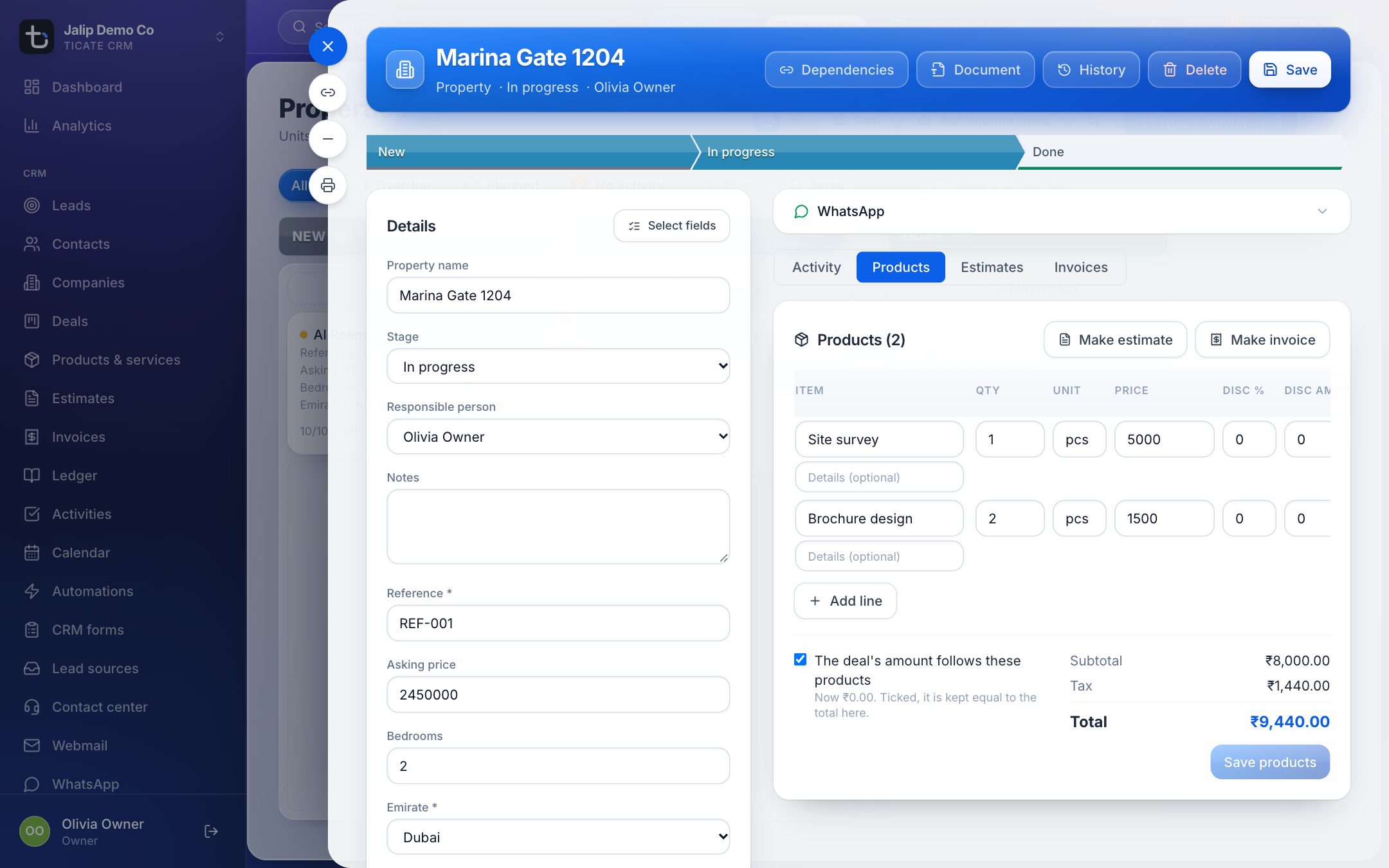
Each record's card now has tabs above the activity box: Activity, Products, Estimates and Invoices. Payments are not a tab on a module record: money is received on the invoice.
Add products to a record
- Open the record and click Products.
- Add a line for each product or service: pick it from your catalogue or type it, with the quantity, price, discount and tax.
- If the module has an Amount field, tick the box under the lines to keep that amount equal to the products' total. (The box is worded for a deal, but on a module record it sets the record's amount.)
- Click Save products.
For how the product lines, tax and discounts work, see Products overview.
Make an estimate or an invoice
Once the products are saved, two buttons appear next to Products:
- Make estimate: an estimate with all the record's product lines.
- Make invoice: an invoice with all the record's product lines. It starts as a draft.
The new document opens in its tab. You can also click New estimate or New invoice in the Estimates or Invoices tab: the form starts with the record's products, to change as you need.
Documents made from a record carry its company and contact, and its deal when it has one. From there they work like any other estimate or invoice: send it, issue it, record payments against it. See Make and send an estimate and Invoice a customer and record a payment.
You need the right to create estimates or invoices for these buttons, and the right to change the record to edit its products.
Automations with products
A module with products can use the automation steps Add a product line and Remove product lines. See Automate a module.
Money owed in instalments
To track money a customer owes in parts, rather than products sold, use a money module such as Client payments instead. Each of its records can be invoiced for its amount with no products at all. See Client payments that pay the deal's invoices.